Vieleicht kann man das ja auch mit einen Texturpinsel schaffen um im Nachgang bei fertigen Objekten noch die Textur zu verändern.
Für den Creative-Modus ist so eine Funktion auf jeden Fall geplant 

Wie wird es aussehen mit eigenen 3D-Objekten ins Spiel zu integrieren?
Das wird nur über ein Plugin möglich sein. Sowas direkt ins Spiel zu integrieren ist leider ein wenig zu riskant, da es bei 3D Modellen viel mehr zu beachten gibt als bspw. bei Postern  Modelle sind manchmal gänzlich unterschiedlich aufgebaut, verwenden verschiedene Koordinatensysteme, und manchmal ist das gewünschte Ergebnis nur durch Zusatzfilter der entsprechenden 3D Software zu erzielen (zB Nurbs), was im Spiel aber fehlt. Mit anderen Worten: Das eigentliche Modell sieht oft anders aus, als was eigentlich beworben wird. Hinzu kommt, dass die Polygonanzahl eine große Rolle spielt: Wenn jemand plötzlich ein Modell mit ein paar Millionen Polygonen ins Spiel lädt und davon ein paar Stück platziert, wird die Performance sehr schnell in den Keller gehen. Das würde dem Spiel dann schnell als "Bug" angekreidet werden
Außerdem gibts im Internet viele "kaputte" Modelle (gerade die kostenlosen Modelle), also Modelle, die fehlerhafte Normalen haben usw. Das kann im Spiel dann zu Renderfehlern führen, was sich aber für den Endanwender erstmal wie ein Bug im Spiel anfühlt.
Wenn Modelle nur über ein Plugin geladen werden können (wie ja auch in der Java Version), handelt der User stattdessen in eigener Verantwortung.
OKe, habe jetzt mal die Report Funktion genutzt  Super sache
Danke für den Report! Den Fehler müssen wir an Unity weiterleiten, aber jetzt am WE passiert da eh nix. Für den nächsten Hotfix haben wir das UI Toolkit Package aber ein wenig modifiziert und zumindest diese Meldung entfernt - denn alleine die Ausgabe der Meldung mitsamt Stacktrace kostet Performance. Das löst das eigentliche "Problem" zwar nicht, aber da bei UI Toolkit erst Mitte-Ende des Jahres Besserung in Sicht ist (im Zuge der 2021.2), denke ich auch nicht, dass dieser Fehler in absehbarer Zeit behoben wird.
noch eine andere kleineigkeit
Hehe, die Ausgaben stammen von uns, die haben wir da bewusst drin Das sind die Funktionen auf Java Seite, für die wir noch kein Gegenstück auf nativer Seite implementiert haben (und damit wir das später nicht "vergessen" meckert der PluginManager jedes mal)^^
Diese Ausgaben verursachen aber keine Probleme, und da sie nur beim Spielstart einmal kommen, gibts auch nix in puncto Performance zu befürchten
Wenn ich einen Block auf Rotationswert 0 auf allen Achsen setze und dann nach Anleitung die Pfeiltaste oben drücke(Z Achse), skaliert sich der Block nicht nach oben sondern seitlich??
Naja, beim Skalieren ist momentan noch eine Funktion aktiv, bei der wir uns noch nicht sicher sind, ob wir sie so drin lassen wollen: Die Skalierung passt sich nämlich abhängig von der Blickrichtung an. Sprich wenn du nach Norden schaust, dann wird das Element mit den Pfeilen Links und Rechts entlang X (rechts) skaliert. Wenn du aber nach Westen schaust, skalieren die selben Tasten entlang der Z Achse (vorwärts).
Die neue Version verwendet übrigens ein linkshändisches Koordinatensystem (X nach rechts, Z nach vorne, Y nach oben).
Hatte ich zwar, lag aber wohl an meiner Großschreibung,
Wir Klein-/Großschreibung noch berücksichtigt? Dann müssten wir das mal ändern...
Es ist möglich unter F3 die ID der Texturen zu sehen, allerdings habe ich die Skalierung der Texturen nicht gefunden.
Wenn du ein Bauteil in der Hand hälst und dann ein anderes Bauteil in der Welt anschaust, dann tauchen unten links Informationen über das Bauteil auf (einschl. der Texturgröße)
Wo finde ich eine Information über die zu spawnenden Items. Ich habe vereinzelt die Standuhr und den Weihnachtsbaum gesehen, aber ich
hatte meine Demo gelöscht und kann ohne den richtigen Befehl dafür nicht mehr auf diese Dinge zugreifen.
Hier ist eine Übersicht: Overview of all items and objects (version 0.2)
Man könnte Schatten in den Einstellungen zwar verringern, aber gäbe es die Möglichkeit diese Effekte "NUR" während des Bauens zu
verringern? Die Schatten sind wunderschön, keine Frage, allerdings fällt mir das Bauen dadurch schwerer.
Hmm... da müssten wir uns mal Gedanken machen... Schatten vorübergehend deaktivieren könnte sich etwas "falsch" anfühlen, denn dadurch würde Licht auch wieder durch die Wand scheinen 
Vielleicht hilft aber später im Creative-Mode aber auch das Licht (L) beim Bauen. Evtl. wäre es hilfreich, wenn wir das Licht in verschiedenen Intensitäten anbieten.
Es war ja bisher so, dass das Item das im Inventar an der 1. Stelle lag, in der Slotleiste auch an 1. Stelle zu finden war. Könnte man dieses System wieder
einführen, oder hat es einen Grund warum das geändert wurde?
Naja, theoretisch ist das immernoch so: In der Java Version waren die obersten 5 Slots trotzdem die Quickslots, wurden aber stattdessen innerhalb des Inventarfensters angezeigt.
Kommt der Size-Befehl wieder ins Spiel? Dieser war extrem nützlich.
Der size-Befehl sollte eigentlich da sein Habe den jetzt nicht nochmal getestet, aber sollte eigentlich klappen. Musst allerdings im Creative-Mode sein, um die Maximalgrößen zu überschreiten.
Auf der Bild ist das Raster aktiv, allerdings nicht zu sehen. HUD wird bei Screenshot nicht mehr angezeigt. Kann man das irgendwo einstellen? Ich habe nichts gefunden. Das HUD Ist hilfreich um sich Koordinaten oder gewisse Baueinstellungen zu speichern. Hud is not hidden!
Leider wird die UI momentan separat gerendert, sodass wir sie nicht ohne Weiteres in die Screenshots inkludieren können. Wir müssen mal schauen, ob wir dafür eine Lösung finden... bis dahin würde es nur helfen, ein externes Screenshotprogramm zu verwenden (Fraps, Shadowplay usw).
Wie ist das mit den Farben/Texturen. Wird es rot wieder geben oder nur durch anmalen?
Ich weiß nicht, ob wir bunte Putzblöcke wirklich brauchen. Mit dem Färben ist das ja eigentlich schon abgedeckt?
Wie repainted man ein angemaltes Objekt. Geht das schrittweise rückgängig zu machen oder nur durch Entfernen bzw. Zerstörung des Objektes?
Leider kann es momentan nur durch Zerstörung rückgängig gemacht werden... ein Tool um Farbe zu entfernen ist aber geplant.
Habe in der Voreinstellung 0.25 6 0.25 vorgegeben. Ich lade die Voreinstellung wieder, aber es wird nur 0.25 5 0.25 geladen.
Die 6 überschreitet im Survival-Modus die maximal erlaubte Größe von 5, daher kann es nicht so groß skaliert werden. Dafür müsstest du dann in den Creative-Mode gehen
In der Ankündigung steht..... Abgeschlossene Türen können nicht mehr aufgehoben werden.....
Im Creativmode trifft das doch nicht zu oder?
Ich glaube das trifft momentan auch auf den Creative-Mode zu... könnten wir theoretisch ändern... du kannst aber ansonsten die Tür auch einfach kurz aufschließen bevor du sie aufhebst
Bisher konnte man in der Java-Version Blöcke ziehen und damit die gewünschte oder gebaute Länge herausfinden. Das ist jetzt nicht mehr möglich. 
Das Ziehen von Blöcken geht weiterhin.
Es gibt eine Standard-Einstellung für Bauteile. Was ist der Standard bzw. die Standards, kann ich die irgendwo nachlesen?
Die meinst die Standardgröße? Du kannst das Feld einfach leer machen, oder alternativ 1 1 1 eingeben (das ist die Standardgröße).
Für den Skaliermodus habe ich nur Legacy und Standard gefunden. Gibt es die Einstellung "World" nicht mehr?
Das ist ein Missverständnis: Du redest vom Rotationsmodus (den kannst du im Radial-Menü oder via Command einstellen, wie in der Java Version). Der Skaliermodus ist quasi nur dafür gedacht, falls jemand das Verhalten wie in der Java Version bei Balken wiederhaben möchte (sodass Breite und Dicke gleichzeitig mit den Pfeiltasten skaliert werden). Ich empfehle hier "Standard"
Das Zerstören von Werkbänken dauert im Creativemode länger als vorher. Das Abholzen von Bäumen auch. Im Survival macht das für Holzfäller sicherlich Sinn,
aber im Creativemode braucht man das eigentlich nicht.
Es ist gewollt, dass Objekte im Creative-Mode 2-3 Schläge brauchen, damit man sie nicht versehentlich kaputt haut. Das müssen wir auch noch für die Bauelemente implementieren.
Beim Ziehen werden die gezogenen Bauteile nicht mehr als ein Item sondern als Einzelteile gesehen und müssen einzeln zerschlagen werden.
Ist das gewollt?
Das ist auch gewollt, denn es war in der Java Version in vielen Fällen eher hinderlich, wenn man eine Reihe von Planken platziert hat, aber man einzelne Planken nicht daraus entfernen konnte.
Für die Zukunft ist aber (zumindest im Creative) ein Undo-Befehl geplant, womit zu solche Aktionen rückgängig machen kannst, falls sie nicht gewollt waren.
.....Neu... Grass kann nun in alle Richtungen wachsen (TBD). Wie funktioniert das?
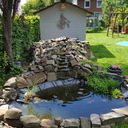
Du kannst jetzt Gras in Höhlen bspw. an Wände und Decken malen. In der Java Version wurde Gras immer nur nach oben dargestellt, d.h. wenn Wände oder Decken damit angemalt wurden, dann war zwar die Grastextur sichtbar, aber keine Grashalme. Jetzt werden auch die Grashalme sichtbar. Wir sind uns da noch nicht ganz sicher, ob wir das beibehalten, denke aber, dass es gar nicht so verkehrt ist. Dadurch ist dann sowas möglich:
Wäre es möglich die Speicherplätze für Voreinstellungen zu erweitern?
Ist grundsätzlich möglich, aber dann wird das Radial-Menü bald etwas überladen...




 UIToolkit muss man zumindest eingestehen, dass es auch noch nicht offiziell für den produktiven Einsatz gedacht ist (sondern erst ab der 2021.2), aber das neue Inputsystem ist seit einigen Monaten "production ready", aber noch sehr problematisch. Vor allem die Mischung aus beidem ist doppelt problematisch, da UIToolkit das neue Inputsystem sehr halbherzig unterstützt (wir warten seit über 6 Monaten auf den Fix eines gravierenden Bugs).

 Ich hab keinen Plan was ich gemacht habe, hier mal der Debug-Log: