


Hmm... this might be a little bit tricky with the Steam version  I'm afraid it doesn't work properly, since the Steam version is delivered with an own JVM. We are looking for a solution for that!
As a workaround, you could use the dedicated server instead (set server_hive_verification in the server.properties to false, and connect to it to "localhost")
Posts by red51
-
-

es hat sich doch ein fehler irgendwie eingeschlichen , beim multiplayer ist das jetzt so für mich wenn ich von a nach b teleportiere dann baut sich die welt irgendwie nicht mehr auf
Hmm... vielleicht wäre ein Serverlog ganz hilfreich. Ist das lediglich beim Teleportieren?
mit dem licht war es jetzt x stunden gut gerade ist mir dann aufgefallen das der fehler im multiplayer wieder da ist in dem bereich sind drei lampen zweimal die quadratische und einmal die rote warnleuchte. der fehler ist aber nur noch zu sehen wenn auf dem server nacht ist
Das ist schade, dass der Fehler wieder auftrat. Grundsätzlich ist das in einigen Fällen tatsächlich möglich, besonders dann, wenn einzelne Chunks zu lange zum Laden brauchen. Also so lange, dass der Nachbarchunk schon längst aufgebaut ist, aber nichts von den Lichtern nebenan mitbekommen hat (dafür muss ein Chunk aber wirklich spürbar schneller aufgebaut sein als der Nachbar).

Es hat sich aber eine kleine Verwechslung eingeschlichen. Die Sounds beim Schließen der Holz- und Metalltruhen sind vertauscht Metalltruhen klingen hölzern und Holztruhen klingen metallisch.
Danke für den Hinweis, das wird korrigiert


Erst bekomme ich eine Steam Seite die mir sagt das ich nun Steam verlasse und dann sehe ich nur:
Oh, habe den Link dummerweise aus der Steam-Ankündigung kopiert, Steam wandelt das ja in seine eigenen Links (à la "Sie verlassen nun Steam") um. Es funktioniert auf jeden Fall, wenn du manuell javadoc.rising-world.net in den Browser eingibst. Habe die Links aber jetzt auch korrigiert

so leid es mit tut weiterer fehlerbericht die tiere buggen sich die wände hoch am gebäude / senkrechte wände , sogar bis aufs dach,
Wurden an diesen Stellen evtl. umfangreiche Terrainmodifikationen vorgenommen? Also bspw. ganze Berge geebnet? Das kann weiterhin Probleme bereiten (da Tiere weiterhin noch eine sehr einfache Wegfindung haben), dies wird aber spätestens mit dem Dungeons Update geändert

-
@nobotious: Sorry for my late response on that (I hope it's not too late^^). But basically you are right, all gui elements GuiPanel (colored rectangles), GuiLabel (texts), GuiImage (like a panel, but containing an image) and GuiTextField (an input text field) are subclasses of "GuiElement"
Btw @topic: It's possible now to add gui elements as a child to another element. However, it's still necessary to register all gui elements to the player (i.e. even child elements), but maybe this will change in the medium run
-
Das ist komisch
 Also vor allem, dass die Holzbalken hingegen noch funktionieren. Also d.h. die Holzbalken funktionieren trotzdem an exakt derselben Stelle, wo du die Planken nicht ziehen kannst?
 -
Thanks for the feedback

Would it be possible to add a world3dmodel to the workbench / sawmill, select the title of the object / requirements / max stack size and make it craftable from there in a later version of the api?
Oh yes, definitely, that's in the works (but first we want to concentrate on the dungeons now, some people are already getting their knives out^^)

Im Einzelplayer hatte ich den Plugin Ordner mit großem "P" geschrieben und alles ging. nun auf den server übertragen und nichts geht mehr. der Plugin Ordner muß mit kleinen "p"lugin geschrieben werden und dann geht es.
Ja also grundsätzlich wird es mit einem kleinen "p" geschrieben. Sorry wenn stellenweise im Forum die Infos noch unvollständig sind, wir werden das nachbessern. Windows macht sich aus Klein-/Großschreibung meist nicht viel, bei Linux hingegen spielt das schon eine Rolle (daher läufts dann im SP mit großen "P", auf dem Server (unter Linux) hingegen nicht
-

Also, I do hope you'll allow us to make man-made gravel (unlimited amount) to make gravel roadways
So you mean something like a way to place gravel to create gravel paths?

Thanks, I've fixed the problem I have installed it and it works perfectly again

Awesome, glad to hear that
-

Hmm sorry red51 aber wo und wie soll ich meine ip für ts3 eintragen.da ist keine txt oder sowas eingetragen so wie bei dem gästebuch.
Also das Problem ist im Grunde, dass diese Beispielplugins in erster Linie als Programmierbeispiele dienen sollen. Der Hintergrund bei diesem Plugin war gewesen, ein sehr einfaches Plugin anzubieten, was wirklich nur einen sehr rudimentären Aufbau hat, ohne irgendein extra Geschnörkel
 Das Auslesen aus einer Datei ist zwar nicht sonderlich kompliziert (zumal die API dafür einfache Hilfsfunktionen anbietet), würde den Aufbau dieses Plugins aber etwas verkomplizieren.
D.h. man müsste tatsächlich, wie @Galveston01 schon sagt, die Codezeile (Zeile 65) player.connectToTeamSpeak("127.0.0.1", 1234, "Gaming/Rising World"); abändern und durch die eigene IP, Port und Channel ersetzen, und das Projekt anschließend kompilieren. Aber dass @Galveston01 eine angepasste Version ja bereits gepostet hat (Danke @Galveston01 für deinen Beitrag! ) ist natürlich umso besser -
There are basically three ways to load a plugin:
- You deploy a compiled jar file in your plugin subfolder
- You deploy class files in the plugin subfolder. Then it's necessary to put a "classinfo.txt" file in your main plugin subfolder (e.g. game/plugins/MyPlugin/classinfo.txt)
- You put a "projectinfo.txt" file into an empty plugin subfolder, which has a reference to your source files. Then the game will compile the project on the fly
If you use a jar, just put the jar file into your plugin subfolder, nothing else you have to do. If you want to load class files, you have to put a "classinfo.txt" file into your project subfolder which contains the name of your plugin: name: MyPlugin.
If you want to compile a project, you need to put a "projectinfo.txt" file there (as @TheMrMik mentioned), you have to put these information into the file:
Important: Unfortunately you have to run the game with the JDK in order to be able to compile your projects. We are still working on a better solution for that.______________________
About reloading your plugins: You can just open console (key ^ or `) and type "reloadplugins", this will unload and reload all existing plugins. This is only intended for testing purposes. When running a multiplayer server, you can alternatively just type "reloadplugins" into server console
-
Der Bug sollte in Kürze behoben sein
-
If there is plugins a folder in la cache folder.
The plugins folder is supposed to be in the main game directory (apart from the plugins subfolder in the cache dir). If there is no plugins folder, just ignore it
However, if you still get the same issue, try to delete the "plugin-api.jar" file in the data/jiw subfolder (in your game directory) manually, then try to verify integrity of game cache again (so Steam re-downloads this file). Now try to run the game, and see if you still run into the same issue
I however didn't tell him that blocks & items tend to fall through also
Yeah, this can happen, depending on the angle, fall speed and item size. Unfortunately it will take some time until we have all physics-related issues sorted out
Saloon doors locked me out again with their animation locking up
That's true, actually I wasn't able to solve the issue in time. At least I'm able to reproduce it now at least
The banister corners are also awesome, yet they're a bit fiddly still because I still haven't figured out (or if there are any) of varying sizes in a height manner
That's one of the flaws of the banisters... I think a better solution is needed (that's why we didn't really implement fences yet)
-
Yeah, unfortunately you don't receive updates immediately in Steam (unless you restart it), sometimes it takes a while. But glad to hear it worked
-
Is the "resources" folder in the jar? The explanation in the pinned topic was a little bit unclear about that: You have to put the "resources" folder into the "src" folder, so when you compile the project, it will be packed into the jar automatically (alternatively you can of course just open the jar file with a zip program [like WinRaR] and put the resources folder there manually).
-
Vielen Dank für das Feedback
Es ist auf jeden Fall immer gut, wenn die Server nach einem Update nicht sofort in Rauch aufgehen. Wenn die Bugfixes und Performanceänderungen dann auch noch Früchte tragen, ist das umso besser!
aber die minischweine...................... supertoll und *herzallerliebst* einfach klasse,
Hehe, das freut mich zu hören
für in der beta noch ne leine ums gassi zu führen, und das kommando um nen ball zu holen , und falls das mal iwann möglich ist, eine zähm option das es nachläuft wie ein hund und du hast ne menge glücklicher spieler
Ja, das ist tatsächlich wahr, sowas wäre schon nicht schlecht. Also generell Haustiere halten zu können. Mal sehen, wann wir an diesem Punkt angelangt sind
dir zu ehren nenn ich das erste minischweinchen in meinem gehege auch 51
-
There have been two small updates a few hours ago which should fix the wool and banister issues
If you're using the Steam version, you may have to restart Steam in order to get the updates.
About the disappearing tree trunks, that's strange, we will check it out! -
Difficulty: Intermediate
This plugin creates a World3DModel in the world (or multiple 3D models). The player can interact with these models (i.e. he can press his interaction key [F] while looking at them), then a GUI shows up. This GUI consists of a background image (an open book, like the journal), and several labels. It lists all players who have played on this world before, this data can be received from the world database (see: plugin.getWorldDatabase()).There are also two buttons to change the page. These are just two labels which are clickable (see: guiElement.setClickable(boolean)). Once they're clicked, the texts of the labels will be changed, so it gives the impression of changing the page (in addition, a sound file is played [see: player:playGameSound()]).
Once the player presses his ESC key (see: player.registerKeys() and player.setListenForInput()), the guestbook will close (i.e. the visibility will be set to false).
Note: The model and the textures are just very basic in terms of quality.
Additional note: In order to keep the plugin versatile, the coordinates for the particular guestbook models are stored in a "coordinates.txt" file in the plugin main folder. So the coordinates can be changed (and even more instances of the model can be added) easily without the need to recompile the plugin.
-
Difficulty: Very easy
Note: A newer version of this plugin is available!
This is basically a very simple plugin: Once a player types "/ts" into chat, he will be connected to a TeamSpeak server (you have to set the ip and port in the plugin).
-
I have verified the cache and follows same, here I send the log
Thanks for the log, that's actually a strange issue
 The files are up-to-date, at least according to their checksums. This issue only occurs in singleplayer? Do you load a world by double-tapping it, or by pressing the red lan button?
Is there a "plugins" folder in your game directory? -
East is the error it gives me with the new version in singleplayer, multiplayer works well
Do you run any plugins?
If not, maybe try to verify integrity of game cache, looks like some gamefiles haven't been updated -
A new update is available
It mainly focuses on the new plugin API, so it is possible now to run your plugins.The plugin API can be considered as a "lite" version of modding, especially since it became quite powerful over the last weeks. Of course it's not exactly the same as creating real mods (e.g. a "total conversion" mod wouldn't be possible this way), but in return, it's much easier to use, and when playing in multiplayer, there is no need to download anything in order to join the server.
But the plugin API not only relevant for multiplayer, but also for singleplayer.Here are a few examples what could be achieved with the new API, just to give you an impression of the potential of the API (especially since it cannot be compared to the old Lua API):
- Elevators (not just basic command/teleport stuff, instead a cabin you can step in, select the target floor, and it will actually move to the desired location)
- Windmills with rotating sails
- A tool rack for your items
- A huge mining drill
- ...
We will upload an example plugin within the next hours. It's basically a guestbook, which gives an overview of all players that have played on your game world in the past (obviously this is mainly interesting for multiplayer server). But as mentioned, it mainly serves as an example plugin. Of course you can still find the Javadoc (which also contains several small examples) here: https://javadoc.rising-world.net/
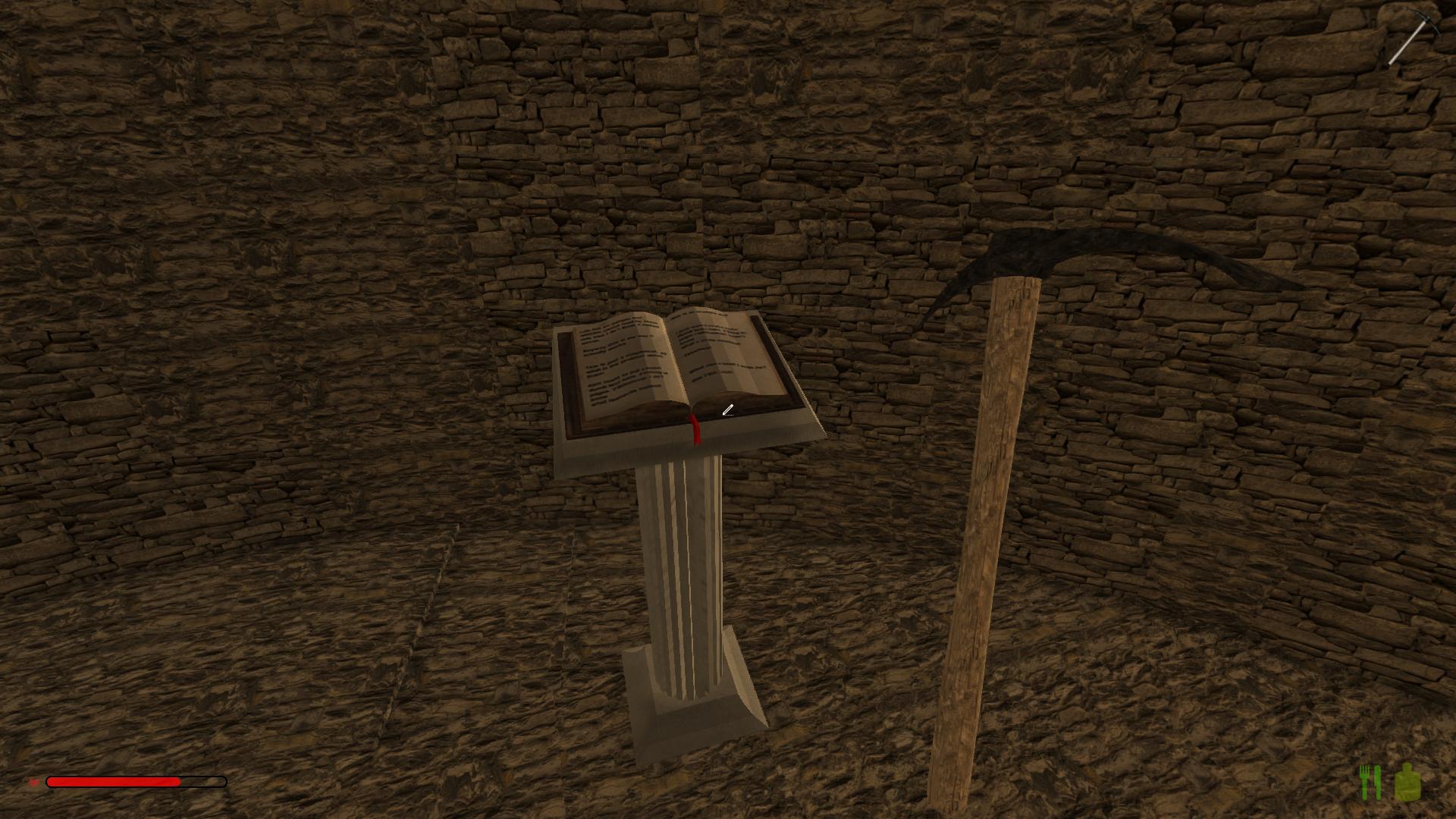
We are also going to provide a new AreaProtection plugin very soon.
Probably the current Lua API will still be supported for 6-8 weeks until it will be discarded. If you need any help converting your scripts to the new API, or if there are any Lua scripts you urgently need for your server, just let us know. We are not going to leave anyone out in the cold
Apart from that, we also did some changes to the game of course, and fixed some bugs. Among others, we added a "pause" mode (when pressing esc), added a new mini pig (just for fun), fixed some lighting issues (rough light transitions between chunks), reworked and improved many sound effects, and got rid of some crashes. As always, you find the full changelog attached.
We will fully concentrate on the dungeons now. We are really sorry that the dungeons update takes so long. Working on the API was actually quite time consuming, but it was really important for us to get it ready now as soon as possible.
Changelog:
- [New] Full release of the new Plugin API
- [New] Plugin sourcefiles can be compiled "on the fly" and will be loaded directly from your project folder
- [New] Added command "reloadplugins" to reload plugins during runtime (also added permission)
- [New] Game will pause now when pressing ESC (singleplayer only), can be disabled in settings
- [New] Added banister corner element
- [New] Added minipig (currently only spawnable via command "spawnnpc minipig")
- [Change] Returning to main menu should be much faster now
- [Change] Speeded up game startup time
- [Change] Improved animal collision (especially object collision)
- [Change] Reworked and improved many sound effects
- [Change] Blocks which are "half sunken" into the terrain will spawn above the ground now when removed by a sledgehammer
- [Change] Preview when placing stone, dirt etc. can be disabled in config (game_show_terrainfillselector)
- [Change] Sticks and lumber are now also craftable at the sawbench
- [Change] Increased min/max size of glass panes
- [Bugfix] Fixed lighting issues (rough light transitions between chunks)
- [Bugfix] Static lights are now visible in lod chunks again
- [Bugfix] Fixed wrong light colors when placing several lamps in hell
- [Bugfix] Objects (furniture etc) will now be affected by new lights (which have just been placed) correctly
- [Bugfix] Slegehammer can now also be used to deconstruct loam blocks
- [Bugfix] Fixed rare crash when changing resolution
- [Bugfix] Items no longer disappear when dropping them from a chest
- [Bugfix] Fixed red colored screen (when player had low health) when returning
- [Bugfix] Apples can no longer be collected from cut appletrees (same applies to lemon and cherry trees)
_____________________________
Bugfix 2016-10-19:- [Change] Adjusted sound for minipigs
- [Bugfix] Fixed trees not getting removed properly
- [Bugfix] Fixed world only loading very slow when teleporting
- [Bugfix] Fixed missing blueprint preview images
- [Bugfix] Fixed missing text for "GuiLabel" elements
- [Bugfix] Fixed issue which prevented you from shearing sheeps in certain situations
- [Bugfix] Fixed some sound issues
- [Bugfix] Fixed a crash when creating a model without collision (API)
- [Bugfix] JDK path "plugin_jdk_path" in the config file to compile plugins on the fly works properly now
- [Bugfix] Adjusted spawn position of tree logs when removing the stump
- [Bugfix] Fixed issue with plugins not working properly in multiplayer when a player disconnects and reconnects
_____________________________
Bugfix 2016-10-21:- [New] New command "plugins" to show all active plugins (sp only)
- [Bugfix] Fixed some sound effects
- [Bugfix] Fixed missing water slash sound
- [Bugfix] Fixed weird physical behaviour when cutting trees
- [Bugfix] Fixed missing custom models after reloading a world
_____________________________
Bugfix 2016-10-22:- [Bugfix] Fixed crash in certain situation when uploading an image for the poster tool
- [Bugfix] Fixed an issue with api labels (wrong position/color after changing properties)
-
Ein neues Update ist verfügbar! Es konzentriert sich diesmal auf die neue Plugin API, es ist nun möglich, Plugins auszuführen.
Die Plugin API kann quasi als "Lite" Version des Moddings betrachtet werden, vor allem da sie durchaus mächtig wurde in den letzten Wochen. Natürlich ist es nicht genau dasselbe, als würde man richtige Mods erstellen (zB ist sowas wie eine "Total Conversion" Mod nicht möglich), aber im Gegenzug ist die API deutlich einfacher zu benutzen, und wenn man im Multiplayer spielt, muss man nicht extra irgendwas herunterladen um einem Server beizutreten.
Aber die Plugin API ist natürlich nicht nur für den Multiplayer relevant, sondern auch für den Singleplayer.Hier sind ein paar Beispiele, was man mit der API umsetzen könnte, nur um einen kleinen Eindruck von den Möglichkeiten der API zu vermitteln (zumal man die API nicht mit der alten Lua API vergleichen kann):
- Aufzüge (keine Commands/Teleportieren Dinge, sondern eine richtige Kabine, in die man hineintreten kann, das gewünschte Stockwerk wählt, und der Aufzug sich in diese Richtung bewegt)
- Sich bewegende Windmühlen
- Ein Werkzeugständer für Items
- Ein riesiger Minenbohrer
- ...
In den nächsten Stunden wird ein Beispielplugin hochgeladen. Es handelt sich dabei im Grunde um ein Gästebuch, welches einen Überblick über alle Spieler gibt, die bereits auf der selben Welt gespielt haben (offenkundig ist dies eher für den Multiplayer interessant). Aber wie gesagt, es handelt sich lediglich um ein Beispiel. Natürlich findet sich auch die Javadoc (welche ebenfalls kleinere Beispiele beinhaltet) wie gewohnt hier:
https://javadoc.rising-world.net/Wir werden zudem sehr bald eine neue Version der AreaProtection anbieten.
Wahrscheinlich wird die aktuellen Lua API weiterhin für 6-8 Wochen unterstüzt, bevor wir sie entfernen werden. Wenn jemand Hilfe bei der Konvertierung der alten Skripte benötigt, oder wenn es generell Skripte gibt, welche für den Serverbetrieb unabdingbar sind, lasst es uns einfach wissen. Wir werden niemanden damit einfach im Regen stehen lassen
Abgesehen davon haben wir auch einige Änderungen am Spiel vorgenommen, und auch ein paar Bugs behoben. Unter anderem gibt es nun einen "Pause" Modus (wenn ESC gedrückt wird), wir haben ein Minischweinchen hinzugefügt (nur zum Spaß @famyko
 ), einige Lichtprobleme behoben (vor allem harte Lichtkanten an Chunkübergängen), viele Soundeffekte überarbeitet und verbessert, und sind ebenso ein paar Crashes losgeworden. Wie immer findet sich anbei der vollständige Changelog.
Wir werden uns nun vollends auf die Dungeons konzentieren. Es tut uns wirklich Leid, dass diese so lange auf sich warten lassen. Die Arbeit an der API war recht Zeitaufwändig, aber es war uns sehr wichtig, diese zu schnell wie möglich einsatzbereit zu bekommen.
Changelog:
- [Neu] Vollständiger Release der neuen Plugin API
- [Neu] Plugin Sourcedateien können automatisch kompiliert und direkt aus dem Projektordner geladen werden
- [Neu] Command "reloadplugins" hinzugefügt um Plugins während Laufzeit neuzuladen (inkl. Permission)
- [Neu] Das Spiel pausiert nun wenn ESC gedrückt wird (nur Singleplayer), kann in Einstellungen deaktiviert werden
- [Neu] Eckelement für Geländer hinzugefügt
- [Neu] Minischweinchen hinzugefügt (momentan nur spawnbar per Befehl "spawnnpc minipig")
- [Änderung] Das Zurückkehren ins Hauptmenü sollte nun deutlich schneller vonstatten gehen
- [Änderung] Spielstart beschleunigt
- [Änderung] Tierkollision verbessert (besonders Objektkollision)
- [Änderung] Viele Soundeffekte verbessert und überarbeitet
- [Änderung] Blöcke, die zur Hälfte im Boden stecken, spawnen nun oberhalb des Boden wenn sie mit dem Vorschlaghammer entfernt werden
- [Änderung] Vorschau beim Platzieren von Stein, Erde etc. kann in config ausgeschaltet werden (game_show_terrainfillselector)
- [Änderung] Stöcke und Holz können nun auch an der Sägebank hergestellt werden
- [Änderung] Mindest-/Maximalgröße von Glassscheiben erhöht
- [Behoben] Beleuchtungsprobleme behoben (harte Kanten an Chunkübergängen)
- [Behoben] Statische Lichter sind nun wieder in LOD Chunks sichtbar
- [Behoben] Fehlerhafte Lichtfarben behoben wenn mehrere Lampen in Hölle platziert wurden
- [Behoben] Objekte (Möbel etc) werden nun von neu platzierten Lichtquellen korrekt beleuchtet
- [Behoben] Seltenen Crash beim Ändern der Auflösung behoben
- [Behoben] Items verschwinden nicht mehr wenn man sie aus einer Kiste wirft
- [Behoben] Vorschlaghammer kann nun auch Lehmblöcke abbauen
- [Behoben] Rot-gefärbten Bildschirm (wenn Spieler wenig Health hatte) beim Zurückkehren ins Hauptmenü behoben
- [Behoben] Äpfel können nicht länger von gefällten Apfelbäumen gesammelt werden (selbiges gilt für Zitronen- und Kirschbäume)
_____________________________
Bugfix 19.10.2016:- [Geändert] Sound für Minischweinchen angepasst
- [Behoben] Behoben, dass Bäume nicht richtig entfernt wurden
- [Behoben] Behoben, dass sich die Welt nach dem Teleportieren nur sehr langsam aufbaut
- [Behoben] Fehlende Blaupausen Vorschaubilder korrigiert
- [Behoben] Fehlende Texte bei "GuiLabel" Elementen behoben
- [Behoben] Problem behoben, dass Schafe manchmal nicht geschoren werden konnten
- [Behoben] Einige Soundprobleme behoben
- [Behoben] Crash behoben, wenn Modelle ohne Kollision über die API erzeugt wurden
- [Behoben] JDK Pfad "plugin_jdk_path" in Config um Plugins während Laufzeit zu kompilieren wird nun korrekt verwendet
- [Behoben] Spawnposition der Baumstammstücke angepasst, wenn der Stumpf entfernt wird
- [Behoben] Probleme mit Plugins im Multiplayer behoben, wenn Spieler disconnected und reconnected ist
_____________________________
Bugfix 21.10.2016:- [Neu] Neuer Command "plugins" um die aktiven Plugins anzuzeigen (nur SP)
- [Behoben] Soundprobleme behoben
- [Behoben] Fehlenden Wasser Splash Sound behoben
- [Behoben] Fehlerhaftes physikalisches Verhalten beim Fällen von Bäumen behoben
- [Behoben] Fehlende Plugin Modelle nach dem Neuladen einer Karte behoben
_____________________________
Bugfix 22.10.2016:- [Behoben] Crash in bestimmten Situationen behoben, wenn Bilder für Poster hochgeladen wurden
- [Behoben] Fehler mit api labels behoben (falsche Position/Farbe nachdem Eigenschaften geändert wurden)

