Advanced tutorial – not suitable for beginners.
First, there are a few prerequisites for achieving the desired result:
- A good mastery of modular snapping construction techniques in manual mode is essential. I will not re-explain the controls in detail, nor which snap points to choose in each instance. Without this skill, achieving a convincing result is impossible.
- Keep the grid active at all times and remember to count carefully to ensure symmetry.
- A research phase, even just finding a few images on Google, helps you understand the direction you are taking.
- Take the time to observe various examples in detail before getting started.
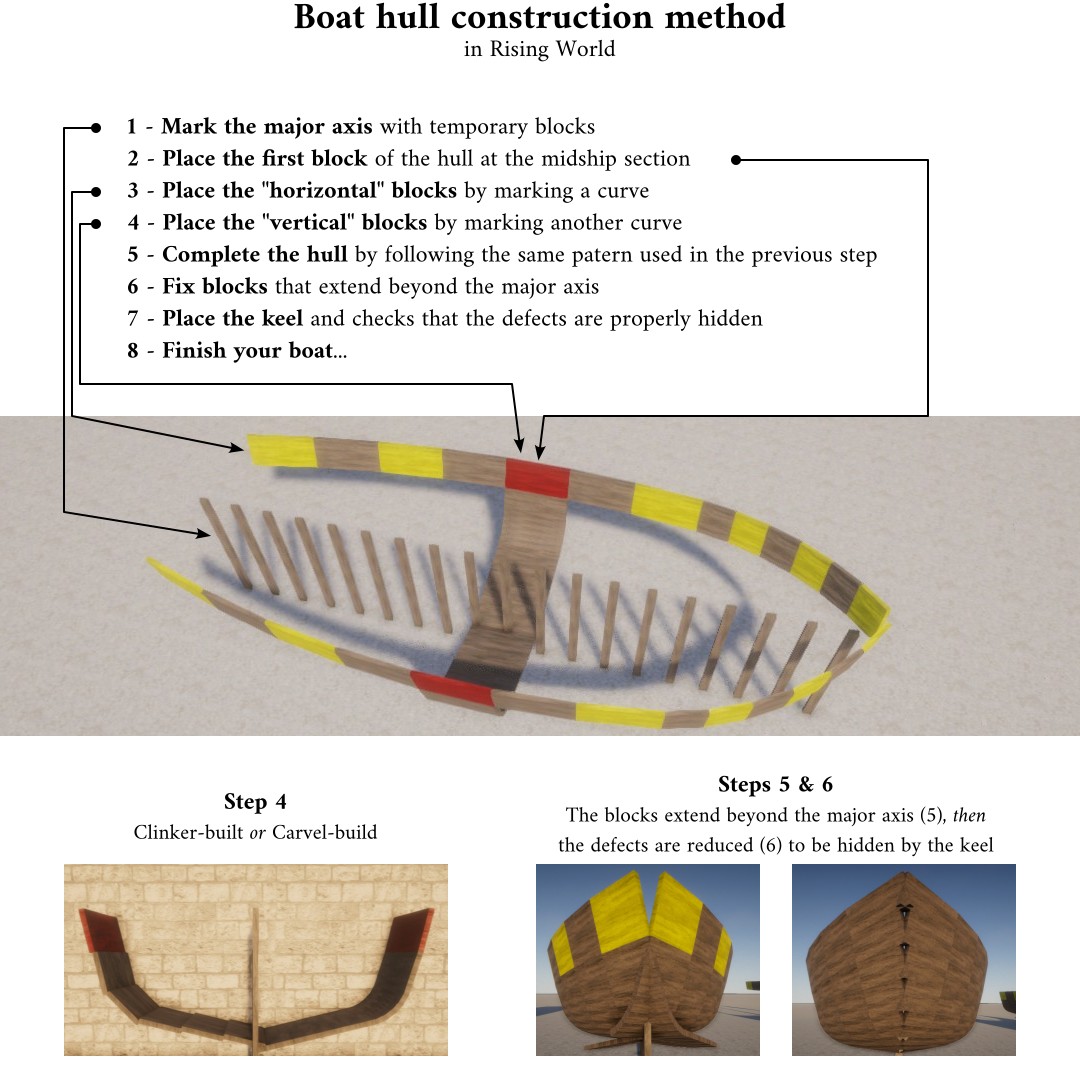
1. Mark the major axis with temporary blocks. This is essential, as you will need to duplicate everything along this axis of symmetry. Once construction is sufficiently advanced (no earlier than step 6), you can remove these blocks.
2. Place the first block of the hull at the midship section – or, more precisely, at the widest point. It’s the red block on the illustration. Ideally, the block's X-axis (height) should be parallel to the major axis (from step 1), so you will need to rotate it. You will generally also need to tilt it slightly inward, depending on the shape you want for your hull. Don't forget to work symmetrically; a second (red) block must therefore be placed.
3. Place the "horizontal" blocks. These are the yellow and un-tinted ones located on either side of the red block. Arrange them to form a curve, which will partially determine the shape of your hull. At the bow, and sometimes at the stern as well, the end of the curve should touch or slightly cross the major axis. To do this, the rotation precision (setr) must be set to a low value (e.g., 2°) and left unchanged until the hull is complete. To build something symmetrical, it’s important to count the number of rotations made using the directional arrows when placing each block.
4. Place the "vertical" blocks. These are the ones located beneath the red block. Arrange them to form a curve, which will partly determine the shape of your hull. The end of the curve should touch or slightly cross the major axis. As in the previous step, you must also count and memorize the overall pattern. At this stage, you can choose between a clinker or a carvel-build, depending on how you position the planks (see illustration).
5. Complete the hull using the same pattern as in the previous step. This time, instead of using the red block to start the curve, you will do that on the others "horizontal" blocks. Some blocks will extend beyond the major axis (see illustration); this will be fixed in the next step, but these blocks are necessary at this initial stage.
6. Fix the blocks that extend beyond the major axis (see illustration). You can do this by reducing their length or width, adding triangles, etc. it doesn't matter how. The goal is to minimize these imperfections enough so that they are hidden when you place the keel (next step).
7. Place the keel and verify that it effectively fix the imperfections. Feel free to paint the protruding blocks; this makes them easier to spot and helps you to correct errors more accurately.
8. Finish your boat... There are still many steps remaining that will not be detailed here.
You can find in attachments a blueprint of the hull of my little cargo ships at various stages of construction: it's an example that can be studied (and dismantle) to better understand the construction technique described here.





 All player-made ships are made of blocks and are purely decorative.
