


Hmm... what resolution do you use exactly for the game? Maybe the debug log contains some information about what was going on. To enable logging, please go to your game directory (rightclick on rw in steam -> properties -> local files -> browse local files) and open the config.properties file with a text editor. Now set "game_debug_console" to true, save the changes, and run the game again. Once you're in main menu, quit the game, then go to the "Logs" subfolder in your game dir. Please upload the latest log file here 
Posts by red51
-
-
So the ingame Steam friend list never appeared?
 Does this issue still persist after the latest hotfix (0.9.2.1)?
 -

3) Medium crate missing label in the crafting list (crafting bench).
This should be fixed with the latest hotfix

DS no longer works after updating, the previous version works just fine.
It looks like the server still uses old definition files. Please make sure to fully delete the "lib" folder, then extract the new files from the server.jar. If it still does not work, please try to move the server into a new folder.

frosted glass unreformed
This should also be fixed with the latest hotfix^^

but i would like to be able to replant trees where i cut them down without having to change the land to farm land first
Hmm... we already changed that with the small hotfix which was available last night
Nevertheless, we released another update, but it will still take a few minutes until it's available for the standalone.
I just noticed that loading lumber into the furnace takes a long time
I will check out what's going on there
_______________________________________________________________________________________
A new update is now available btw (0.9.2.1)! Multiplayer servers also need to be updated.
Changelog:
- [Change] Item animations now stop when opening the inventory or any other window
- [Change] Changed default spawn position when creating a new world
- [Change] Changed initial game time when creating a new world (early morning hours)
- [Bugfix] Fixed apperance of glass panes (especially when refractions are turned off)
- [Bugfix] Fixed missing labels in crafting menu
- [Bugfix] Fixed crash when starting the game on 64 bit linux
- [Bugfix] Fixed issues with wooden torch mount
- [Bugfix] Fixed a sound issue when crafting an item
- [Bugfix] Fixed a crash related to certain clothes
- [Bugfix] Fixed connection issues in multiplayer on MacOS
-

Das Einfüllen der Kohle in den Schmelzöfen geht nur noch sehr langsam. Man muss jeweils klicken. Schnelles klicken bringt auch nichts.
Ich werde mir das mal genauer ansehen...

davor war damit einfach und besser zumzugehen
Der Wirkungsbereich ist allerdings weiterhin um das Fadenkreuz herum
______________________________________________________________________________________________
Ein neues Update ist nun übrigens verfügbar (0.9.2.1)! Multiplayer-Server müssen dafür ebenfalls geupdated werden.
Changelog:
- [Geändert] Item Animationen stoppen nun wenn das Inventar oder ein anderes Fenster geöffnet wird
- [Geändert] Standard Spawnposition beim Erstellen einer neuen Welt angepasst
- [Geädnert] Start-Uhrzeit beim Erstellen einer neuen Welt geändert (früher Morgen)
- [Behoben] Anzeige von Glasscheiben korrigiert (besonders wenn Refraktion deaktiviert ist)
- [Behoben] Fehlende Beschriftungen im Craftingmenü behoben
- [Behoben] Crash beim Spielstart unter 64 bit Linux behoben
- [Behoben] Probleme mit Fackelhalterung (Holz) behoben
- [Behoben] Soundproblem beim Craften von Items behoben
- [Behoben] Crash im Bezug auf manche Kleidungsstücke behoben
- [Behoben] Verbindungsprobleme im Multiplayer unter MacOS behoben
-
-
Hmm... yeah the friend list is apparently missing
Is it still missing when restarting the game?
As a workaround, you can of course still join people through the regular friend list in Steam. -
Leider sind Leerzeichen im Namen nicht vorgesehen
 Es gab damals mal einen kurzen Zeitraum, in welchem aufgrund eines Fehlers ein Name mit Leerzeichen ausgewählt werden konnte. Das ist zwar behoben, aber alle damals erstellten Accounts haben natürlich noch ein Leerzeichen im Namen.
In diesen Fällen ändern wir selbstverständlich den Spielernamen auf Wunsch. Es muss allerdings berücksichtigt werden, dass der Spieler nach einer Namensänderung als neuer Spieler auf Servern gilt, d.h. das Inventar und evtl. andere Zuweisungen (Gruppe, Areas etc) fehlen. Hier ist es sinnvoll, vorher das Inventar in Sicherheit zu bringen (zB in einer Kiste verstauen), und sich nach der Namensänderung von einem Admin erneut eine etwaige Gruppe/Area zuweisen zu lassen. -
Unfortunately the 0.9.1.5 version is no longer available
 Which server do you play on? Usually most admins update their servers in a timely manner.
 -
This issue will be fixed with the next hotfix
-
-
The issue should be fixed now, thanks for your patience
If you still experience any issues, please let us know -

And I can't seem to make it work by just double-clicking on anything.
If Java is linked to jar files, you can execute them via double click
Nevertheless, I've re-uploaded the rcon tool with a fixed exe, now it should work: https://download.rising-world.net/tools/rcon.zip
-
How can I add friends? I have the standalone version.
Support for Steam P2P or the Steam friend list is unfortunately only available in the Steam version of the game

-
Not Working for me Either
If you cannot execute the .exe, just execute the "rcon.jar" (on Windows, just double-click on it)
-
This seems to be a MacOS specific issue
Thanks for the log snippet, we will check out what's going on there and fix this issue asap! -
Danke für das Feedback

1. Vom "Sicherheitshelm (Lampe)" fehlt der text in der liste.
Das Problem sollte in Kürze behoben sein

Ein Manko hätte ich noch. Und zwar: Die Bausetzlinge kann man auch nur noch auf Ackerboden pflanzen. Das find ich jedoch etwas umständlich.
Oh, das ist tatsächlich nicht gewollt. Die Änderung sollte sich eher auf kleinere Setzlinge beziehen... das wird geändert^^
-
Thanks for the feedback
did you fix the bug in the API yet?
Yes, it is fixed. Probably the new API will be released tomorrow (although I guess it should still work with the old API lib).

I have a java error on launch : (Debian Strech - Steam version
Thanks for posting the error message! It was actually an issue with the 64 bit Linux version, I'm sorry about that. However, we just released a hotfix which should solve this issue. If you still experience any problems, please let us know
and maybe you can add Batteries?? that would be Cool maybe in the Abandoned shacks....
Probably something like batteries will be added in the long run
Nice Update red51!!! Did RCON support get removed?
RCON support is still there, but it's necessary to download the latest version of the rcon tool (sorry about the missing info): https://download.rising-world.net/tools/rcon.zip
-

Werde ich gleich mal antesten ;D Müssen die Server auch aktualisiert werden ?
Jap, die Server müssen für dieses Update ebenfalls geupdated werden^^

immernoch keine Pferde aber trotzdem noch ausdauer
Das stimmt, aber dafür hält die Ausdauer jetzt wesentlich länger an
-
Hi everyone!
Finally we managed to finalize the work on the new networking code. This update introduces a new networking system which should be less error prone than the old one. But at the same time, we also added support for Steam P2P multiplayer. This means you can finally host a game on your machine without having to forward ports or use Hamachi or something like that. Now you can simply hit the "Play with friends" button in singleplayer menu and invite your friends through your friendlist - alternatively a friend of yours can simply join your game if you're playing multiplayer.
The new networking system now also contains an automatic reconnect feature. If you lose connection for a brief moment, the game will automatic reconnect to the server - ideally without any interruptions. The typical "10 minutes disconnect" some people were suffering from should be history.
Of course we only had limited possibilites to put this feature to the acid test, so we really need your feedback. If you experience any sudden disconnects or other multiplayer issues, please let us know.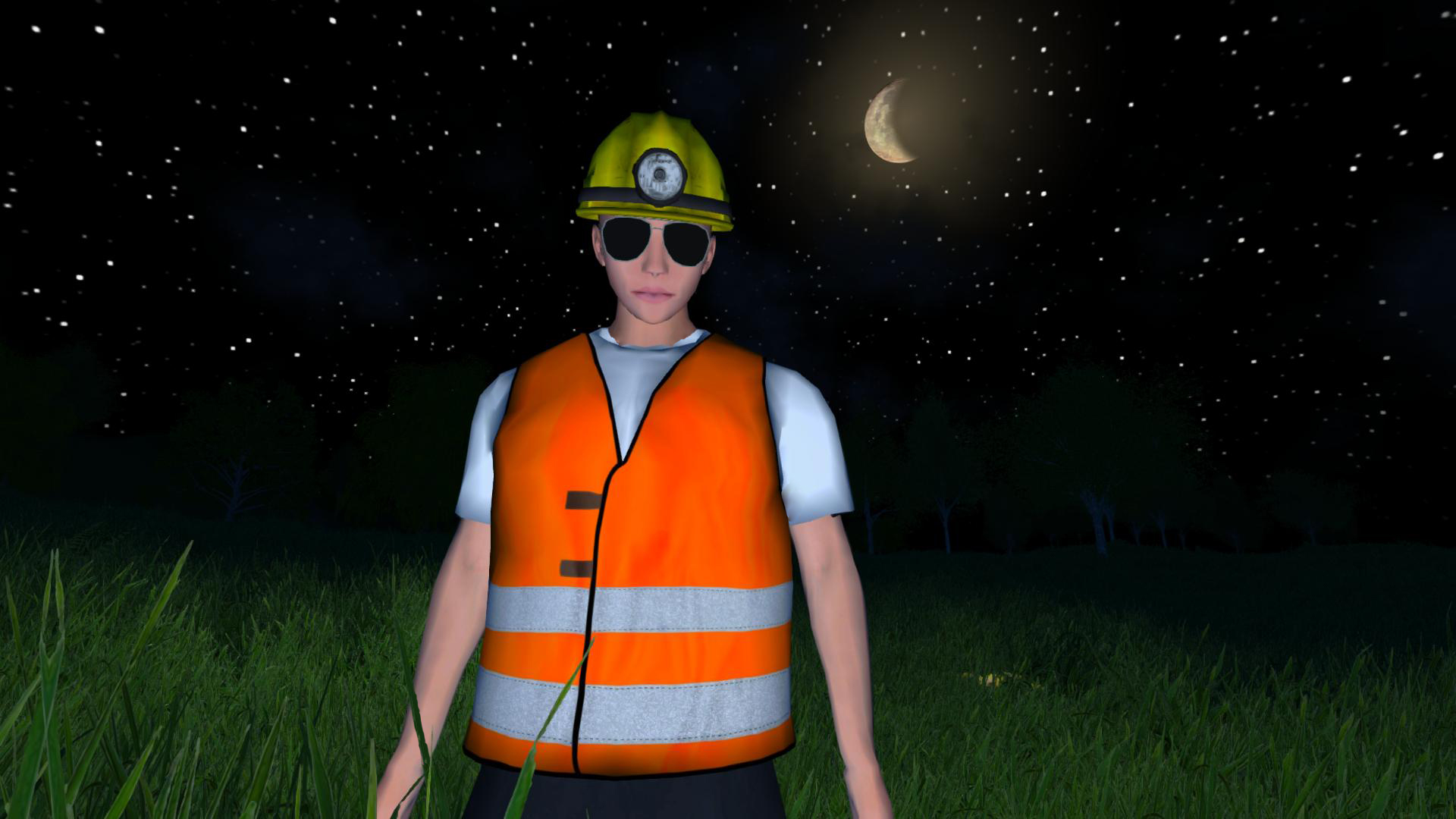
This update also introduces new haircuts and new clothes, or more precisely, new headgear, including two special items of equipment: helmets with integrated lamps, which provide the player with light. The previous debug light (L) is now disabled (but still available in creative mode).
As usual, the updates contains a few bugfixes and changes. For example, we reduced the clipping of the player body through clothes. The result still isn't perfect and it needs more work, but it's an improvement compared to the previous situation.
Apart from that we did some optimizations to the world generation, and also reduced the overall memory consumption.Stay tuned for the next update!
_______________________________
Changelog:- [New] Integrated Steam P2P Networking (invite friends without having to forward ports)
- [New] Added Steam friend list support (able to join and invite friends)
- [New] Reworked networking code from scratch (should be less error prone now)
- [New] Added automatic reconnect for multiplayer (to catch small connection interruptions)
- [New] Added two new helmets with integrated lamps (L)
- [New] Added new headgear: cowboy hat, pilgrim hat, cappy (camo), balaclava, chef hat, unclesam hat
- [Change] Reduced clipping of player body (visible through clothes) (work-in-progress)
- [Change] World generates faster now when there are lots of buildings
- [Change] Reduced direct memory consumption
- [Change] Slightly reduced running speed
- [Change] Stamina lasts longer now
- [Change] Beard now gets covered by face masks
- [Change] Updated sounds of wooden sword
- [Change] Updated appearance of military helmet
- [Change] Objects can no longer be placed on animals or players
- [Change] Removed debug light (L) from survival mode
- [Change] Improved performance when placing large blueprints
- [Change] Command "undoblueprint" works much faster now
- [Change] Improved performance of creative removal tool (F7)
- [Change] Player no longer uses sprint animation when having broken bones (Multiplayer)
- [Change] Saplings can be placed anywhere in creative mode
- [Bugfix] Fixed disconnect in multiplayer (in certain situations) after 10 minutes (need feedback)
- [Bugfix] Fixed lighting issues of player headgear (multiplayer)
- [Bugfix] Fixed issue of players being invisible in multiplayer sometimes (need feedback)
- [Bugfix] Fixed being able to place multiple ores into the same furnace slot
- [Bugfix] Spinning wheel no longer consumes too much wool/cotton/fibers (Multiplayer)
- [Bugfix] Fixed wrong crossbow position for other players in multiplayer
- [Bugfix] Fixed missing label when picking up clothing items
- [Bugfix] Saplings can only be planted on farmland again (in survival mode)
- [Bugfix] Scoreboard (tab) updates properly now
Hotfix 0.9.2.1:
- [Change] Item animations now stop when opening the inventory or any other window
- [Change] Changed default spawn position when creating a new world
- [Change] Changed initial game time when creating a new world (early morning hours)
- [Bugfix] Fixed apperance of glass panes (especially when refractions are turned off)
- [Bugfix] Fixed missing labels in crafting menu
- [Bugfix] Fixed crash when starting the game on 64 bit linux
- [Bugfix] Fixed issues with wooden torch mount
- [Bugfix] Fixed a sound issue when crafting an item
- [Bugfix] Fixed a crash related to certain clothes
- [Bugfix] Fixed connection issues in multiplayer on MacOS
-
Hi Leute!
Endlich konnten wir unsere Arbeit am neuen Netzwerk Code abschließen. Dieses Update führt ein neues Netzwerksystem ein, welches weniger fehleranfällig als das alte sein dürfte. Gleichzeitig bieten wir nun auch Unterstützung für Steams P2P Multiplayer an. Das bedeutet, dass es nun endlich möglich ist, Freunde ins eigene Spiel einzuladen ohne Ports freigeben oder Programme wie Hamachi nutzen zu müssen. Jetzt kann einfach der "Mit Freunden spielen" Button im Singleplayer-Menü gedrückt und Freunde über die Steam Freundesliste eingeladen werden - alternativ können Freunde dem Spiel auch selber beitreten.
Das neue Netzwerksystem beinhaltet nun auch einen automatischen Reconnect. Falls die Verbindung für einen kurzen Augenblick verloren geht, wird das Spiel die Verbindung selbständig wieder aufnehmen - idealerweise völlig unterbrechungsfrei. Der typische "10-Minuten-Disconnect", unter welchem manche Spieler leiden mussten, dürfte damit der Vergangenheit angehören.
Allerdings hatten wir natürlich nur eingeschränkte Möglichkeiten, dieses Feature auf Herz und Nieren zu testen, sodass wir auf euer Feedback angewiesen sind. Falls also irgendwelche Disconnects oder andere Multiplayerprobleme auftreten sollten, lasst es uns bitte wissen.Dieses Update führt auch ein paar neue Haarschnitte und Kleidungsstücke ein, oder genau genommen neue Kopfbedeckungen. Darunter finden sich zwei spezielle Gegenstände: Helme mit integrierten Lampen, welche Licht spenden. Das vorherige Debug Licht (L) wurde entsprechend entfernt (ist aber im Creative-Modus weiterhin verfügbar).
Wie immer bringt dieses Update auch eine Reihe an Bugfixes und Änderungen. Beispielsweise haben wir das Durchscheinen der Spielerfigur durch Kleidung reduziert. Das Resultat ist zwar noch nicht perfekt und braucht weitere Anpassungen, aber es sollte eine Verbesserung darstellen verglichen zum vorherigen Zustand.
Abgesehen davon haben wir auch einige Optimierungen an der Weltgenerierung vorgenommen sowie den Memoryverbrauch reduziert.Bleibt gespannt auf das nächste Update!
_______________________________
Changelog:- [Neu] Steam P2P Multiplayer integriert (Freunde einladen ohne Ports freizugeben)
- [Neu] Support für die Steam-Freundesliste eingebaut (Freunden beitreten und einladen)
- [Neu] Netzwerkcode von Grund auf überarbeitet (sollte nun weniger fehleranfällig sein)
- [Neu] Automatischen Reconnect für Multiplayer hinzugefügt (um kleine Verbindungsabbrüche abzufangen)
- [Neu] Zwei neue Helme mit integrierte Lampe hinzugefügt (L)
- [Neu] Neue Kopfbedeckung hinzugefügt: Cowboyhut, Pilgerhut, Cappy (Camo), Balaclava, Kochmütze, Unclesam Hut
- [Geändert] Hindurchscheinen des Spielerköpers durch Kleidung reduziert (noch in Arbeit)
- [Geändert] Direct Memory Verbrauch reduziert
- [Geändert] Welt generiert sich nun schneller wenn viele Bauwerke vorhanden sind
- [Geändert] Sprint-Geschwindigkeit etwas reduziert
- [Geändert] Ausdauer wird nun weniger schnell verbraucht
- [Geändert] Bart wird nun durch Gesichtsmasken verdeckt
- [Geändert] Sounds des Holzschwertes angepasst
- [Geändert] Aussehen des Militärhelmes angepasst
- [Geändert] Objekte können nicht mehr auf Spielern oder Tieren platziert werden
- [Geändert] Debug-Licht (L) aus Survival-Modus entfernt
- [Geändert] Performance verbessert beim Platzieren von großen Bauplänen
- [Geändert] Befehl "undoblueprint" arbeitet nun viel schneller
- [Geändert] Performance des Lösch-Werkzeuges im Creative Modus (F7) verbessert
- [Geändert] Spieler nutzt nicht länger Renn-Animation wenn Knochen gebrochen sind (Multiplayer)
- [Geändert] Setzlinge können im Creative Modus überall platziert werden
- [Behoben] 10-Minuten Disconnect im Multiplayer (der in manchen Fällen auftrat) behoben (Feedback benötigt)
- [Behoben] Beleuchtungsprobleme von Kopfbedeckungen (Multiplayer) behoben
- [Behoben] Problem mit unsichtbaren Spielern im Multiplayer behoben (Feedback benötigt)
- [Behoben] Es können nicht mehr mehrere Erze im selben Ofenslot platziert werden
- [Behoben] Spinnrad verbraucht nicht mehr zu viel Wolle (Multiplayer)
- [Behoben] Falsche Armbrust Position anderer Spieler im Multiplayer behoben
- [Behoben] Fehlende Bezeichnung beim Aufheben von Kleidungsstücken behoben
- [Behoben] Setzlinge können im Survival Modus nun nur noch auf Ackerboden platziert werden
- [Behoben] Das Scoreboard (Tab) aktualisiert sich nun korrekt
Hotfix 0.9.2.1:
- [Geändert] Item Animationen stoppen nun wenn das Inventar oder ein anderes Fenster geöffnet wird
- [Geändert] Standard Spawnposition beim Erstellen einer neuen Welt angepasst
- [Geädnert] Start-Uhrzeit beim Erstellen einer neuen Welt geändert (früher Morgen)
- [Behoben] Anzeige von Glasscheiben korrigiert (besonders wenn Refraktion deaktiviert ist)
- [Behoben] Fehlende Beschriftungen im Craftingmenü behoben
- [Behoben] Crash beim Spielstart unter 64 bit Linux behoben
- [Behoben] Probleme mit Fackelhalterung (Holz) behoben
- [Behoben] Soundproblem beim Craften von Items behoben
- [Behoben] Crash im Bezug auf manche Kleidungsstücke behoben
- [Behoben] Verbindungsprobleme im Multiplayer unter MacOS behoben
 Das wird auf jeden Fall geändert, nachher wird ein kleiner Hotfix dazu erscheinen, danach sollten sich die Baum-Setzlinge wieder wie gewohnt überall platzieren lassen
